
Free Ghibli AI Generator: Turn Any Photo into Ghibli Art
Turn any photo into dreamy Studio Ghibli–style art — soft hand-painted textures, warm pastel colors and lush painterly backgrounds. Just upload an image and generate, no prompt writing needed — then download your finished art free, ready to share.
Click to upload an image
or drag and drop • Max 10MB
Image resolution quality
Seed for reproducible results
File format for the generated image
Est. time: up to 25 sec
Example results — your generation will appear here.
Photo to Ghibli Style in 3 Steps
There's no prompt to write and nothing to set up — just upload your photo, generate, and download the finished Ghibli art.
1. Upload your photo
Drop in a portrait, pet, landscape or any photo you'd like to reimagine in Ghibli style. JPEG, PNG or WebP all work.
2. Generate the Ghibli version
Click Generate. The Ghibli style prompt is preset for you, so the AI redraws your photo with soft hand-painted textures and warm colors in seconds.
3. Download your art
Preview the result and download it watermark-free as JPEG or PNG, ready to share or print.
Studio Ghibli AI Generator: Before & After Results
Every example below is a real photo turned into Ghibli-style art with this tool — no extra editing.

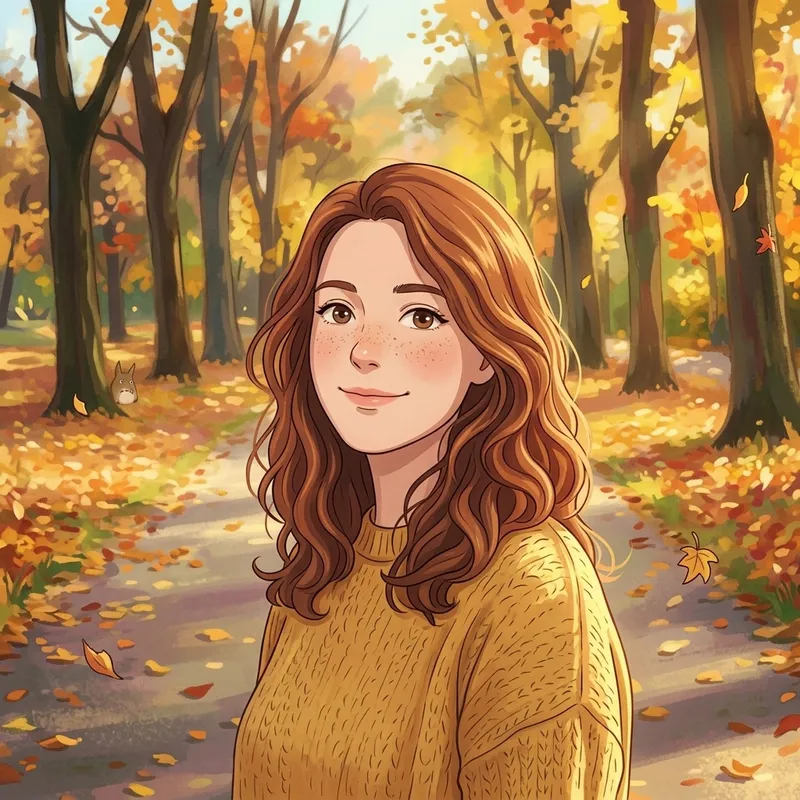


What People Use the Ghibli AI Generator For
People use the Ghibli AI generator to transform portraits, pet photos, travel shots, and landscapes into keepsakes with the soft, nostalgic, hand-painted look that defines Studio Ghibli's visual style.
Profile pictures & avatars
Turn a selfie into a gentle Ghibli-style portrait for social media, chat apps and gaming profiles.
Pet portraits
Reimagine your cat or dog as a character from a Ghibli film — a heartfelt, shareable keepsake.
Landscapes & travel photos
Convert scenery and travel shots into lush painterly backdrops with that signature Ghibli warmth.
Gifts & prints
Create a unique piece of art from a meaningful photo to print, frame or give as a gift.
Use the Ghibli AI Generator Free
Turn your photos into hand-painted Ghibli art in seconds — no prompts to write, no settings to learn, and no design skills needed.
No prompt writing
The Ghibli style is preset. You just upload and click — no need to figure out the right words.
Free to try, yours to keep
New accounts start with free credits — no purchase needed. Download your finished Ghibli art clean and ready to share.
Identity preserved
Faces and composition stay recognizable while your photo is restyled, so the subject still looks like themselves.
Your Questions About Making Ghibli Art, Answered
Everything you might wonder before you upload your first photo — how to do it, what to expect, and what you can do with the result.
How do I turn my photo into Ghibli-style art?
Upload the photo you want to transform, then click Generate — that's it. You don't have to write a prompt or adjust any settings; the Ghibli look is already set up for you. In a few seconds you'll see your photo redrawn with soft hand-painted textures and warm pastel colors.
Will I still look like myself in the result?
Yes. Your face and the overall composition of the photo are kept intact while the Ghibli style is painted over the top, so you (or your pet, or the scene) stay clearly recognizable — just reimagined as gentle hand-drawn art.
Which of my photos will give the best result?
Clear, well-lit photos work best — a sharp portrait, a close-up of your pet, or a scenic travel shot all transform beautifully. Avoid very dark or blurry images. You can upload JPEG, PNG or WebP files straight from your phone or computer.
How long does it take, and what if I don't like the result?
Each image is usually ready in a few seconds. If the first version isn't quite what you pictured, just generate again or try a different photo — every run is a fresh take, so it's easy to keep going until you're happy with it.
Can I download, share, and print the art I create?
Absolutely. You can download your finished image as a JPEG or PNG with no watermark, so it's ready to set as a profile picture, post on social media, send to friends, or print as a keepsake or gift.
Do I have to pay to use it?
No — you can start for free. New accounts get free credits on signup with no credit card required, and you only need more credits if you generate a lot. See the credit details on the pricing page.See pricing & credits
What happens to the photos I upload?
Your uploaded photo is used only to generate your Ghibli art — it isn't shared or sold. For the full details on how your data is handled, see our Privacy Policy.Read our Privacy Policy
Is this an official Studio Ghibli tool?
No. This is an independent tool and is not affiliated with, endorsed by, or sponsored by Studio Ghibli. 'Ghibli style' here refers to a general hand-painted art aesthetic; all trademarks belong to their respective owners.
Create your Ghibli art now
Create your first Ghibli art in seconds with free credits on signup — no credit card required.